

69-Inch Mid-Century TV Stand: Sliding Doors + Charging
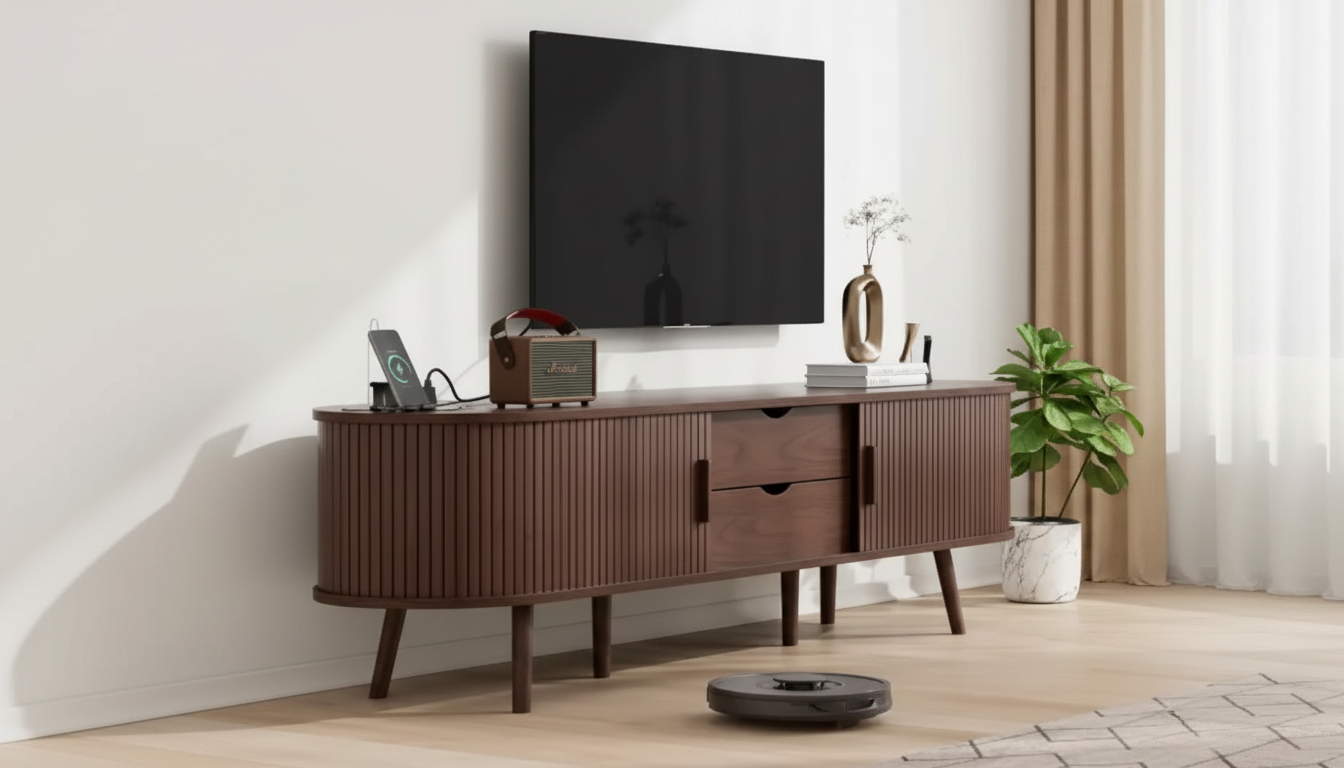
69″ Mid Century Modern TV Stand with Charging Station & Sliding Doors
A long, low media console can anchor a living room while keeping cables, remotes, and components under control. This 69-inch mid century modern TV stand pairs clean lines and sliding doors with a built-in charging station, making it easier to keep devices powered and the setup looking tidy. For more guidance, see 55-inch TV Stand With Power Outlet & Storage.
What Makes This TV Stand a Practical Mid Century Modern Pick
If the goal is a calm-looking media wall that still works hard every day, a wide console with smart access points tends to outperform smaller, overstuffed cabinets. A 69-inch width fits many common living-room layouts, reads as a balanced focal point under a TV, and keeps the profile low so the room feels open rather than top-heavy. For further reading, see Alohappy Mid-Century Modern, Solid 60 Inch TV Stand, Sliding Door ….
Sliding doors add real-world convenience, especially in apartments and tighter seating arrangements. Since they don’t swing outward, there’s no need to reserve clearance in front of the stand—helpful when a coffee table or sectional sits close. The built-in charging station concept also aligns with how living rooms are used now: phones, tablets, earbuds, and controllers often live near the sofa, so having power integrated into the console helps reduce “charger sprawl.”
Visually, mid century modern styling typically plays well with walnut tones, tapered-leg inspiration, and minimalist decor. And because this format works as both a media console and a storage sideboard, it can pull double duty in open-plan rooms where one piece often needs to serve multiple functions.
At-a-Glance Specs and Fit Guide
Before buying any 69-inch stand, it helps to confirm two things: the TV’s footprint (the distance between its legs or the width of its base) and the real clearance in the room. Screen size alone doesn’t guarantee fit—some large TVs have narrow center stands, while others have wide-set legs that need more surface area.
Also think through a simple cable strategy. Plan a clean power path to the nearest outlet, and separate low-voltage signal cables (HDMI/audio) from power cords when possible. If you’ve ever chased a mysterious buzz or signal glitch, the FCC’s consumer guide on interference is a useful reference for device placement and cable routing: https://www.fcc.gov/consumers/guides/interference.
| What to measure or confirm | Why it matters | Quick tip |
|---|---|---|
| TV footprint (stand legs/base width) | Ensures the TV sits securely without overhang | Leave a little extra width on each side for a balanced look |
| Wall-to-sofa viewing distance | Helps determine comfortable screen size and placement | Center the screen roughly at seated eye level when possible |
| Outlet location and cord length | Prevents visible extension cords crossing walkways | Route power along the wall and use cord covers if needed |
| Ventilation space for components | Reduces heat and improves device longevity | Avoid stacking consoles; leave breathing room around vents |
| Door travel and access | Ensures daily usability in tight rooms | Sliding doors work well where swing doors would bump furniture |
Charging Station and Cable Management Setup
A charging station is most useful when it’s treated like a “power zone,” not a place where every cable in the home lands. Group high-traffic charging (phones, tablets, controllers) on one side of the console, and reserve the other side for AV components. That separation makes it easier to keep the front of the room looking intentional.
If you’re planning a more energy-aware setup, ENERGY STAR’s TV resources can help you think through usage and power consumption over time: https://www.energystar.gov/products/televisions.
Sliding Doors: Everyday Benefits and Best Practices
Room Styling Ideas for a 69″ Mid Century Modern Console
Care, Maintenance, and Long-Term Use
Product Spotlight: 69″ Mid Century Modern TV Stand with Charging Station & Sliding Doors
For current details and availability, view the product page: 69″ Mid Century Modern TV Stand with Charging Station & Sliding Doors. Listed price at the time of writing: $1128.95 (USD).
| Detail | Value |
|---|---|
| Product name | 69″ Mid Century Modern TV Stand with Charging Station & Sliding Doors |
| Price | 1128.95 USD |
| Format | TV stand / media console |
| Notable features | Charging station, sliding doors |
| Product page | https://hovira.com/69-mid-century-modern-tv-stand-with-charging-station-sliding-doors/ |
More In-Stock Finds to Complement Your Space
- Modern Glass Storage Jar with Golden Butterfly – Elegant Home Decor (a polished accent for shelves or a console vignette)
- Women’s Abstract Print Loose Hoodie (cozy layering for movie nights)
- Ultrasonic Skin Scrubber Deep Face Cleaning Machine (a small self-care upgrade that stores neatly in a drawer or cabinet)
FAQ
Will a 69-inch TV stand work with larger TVs?
It can, as long as the TV’s base or leg width fits on the surface without overhang and the stand can support the TV’s weight. Measure the TV footprint, leave a little margin on both sides, and check the stand’s load rating if it’s provided.
How do sliding doors affect using remotes and game consoles?
Solid sliding doors can block IR signals, so devices may work best with the door partially open or with the console positioned closer to the opening. Also allow ventilation space around consoles to help manage heat during longer sessions.
What’s the easiest way to keep charging cables from looking messy on a media console?
Use short charging cables, route them with adhesive clips, and hide power bricks in a cable box inside a compartment. Label adapters and keep power and signal lines separated so the setup stays neat and easier to troubleshoot.













Leave a comment